Example of RichTextBox Control in VB.NET
Design a simple Notepad application using MenuStrip, Common Dialog Control and RichTextBox that allows user to
(1) Create New File
(2) Save and Open File
(3) Set fore color and back color
(4) Set font style
(5) Edit Text (Cut, Copy, Paste, Redo, Undo)
Step 1: Design a form as shown below:
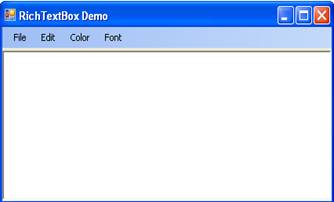
Step 2: Now set properties of various controls as given below:
| Control Name | Property Name | Value |
Form1 |
Text |
RichTextBox Demo |
RichTextBox1 |
Name |
RichTextBox1 |
OpenFileDialog1 |
Name |
OpenFileDialog1 |
Filter |
RTF|*.rtf |
|
DefaultExt |
Rtf |
|
SaveFileDialog1 |
Name |
SaveFileDialog1 |
Filter |
RTF|*.rtf |
|
DefaultExt |
Rtf |
|
FontDialog1 |
Name |
FontDialog1 |
ColorDialog1 |
Name |
ColorDialog1 |
Step 3: Now write code fore various menu items as given below for various functionality:
(1)New
If RichTextBox1.Text.Length <> 0 Then
If MsgBox("Save File?", MsgBoxStyle.Information + MsgBoxStyle.YesNo) = MsgBoxResult.Yes Then
If SaveFileDialog1.ShowDialog = Windows.Forms.DialogResult.OK Then
RichTextBox1.SaveFile(SaveFileDialog1.FileName)
End If
Else
RichTextBox1.Clear()
End If
End If
If MsgBox("Save File?", MsgBoxStyle.Information + MsgBoxStyle.YesNo) = MsgBoxResult.Yes Then
If SaveFileDialog1.ShowDialog = Windows.Forms.DialogResult.OK Then
RichTextBox1.SaveFile(SaveFileDialog1.FileName)
End If
Else
RichTextBox1.Clear()
End If
End If
(2)Save
If SaveFileDialog1.ShowDialog = Windows.Forms.DialogResult.OK Then
RichTextBox1.SaveFile(SaveFileDialog1.FileName)
End If
RichTextBox1.SaveFile(SaveFileDialog1.FileName)
End If
(3)Open
If OpenFileDialog1.ShowDialog = Windows.Forms.DialogResult.OK Then
RichTextBox1.LoadFile(OpenFileDialog1.FileName)
End If
RichTextBox1.LoadFile(OpenFileDialog1.FileName)
End If
(4)Exit
If MsgBox("Do You Really want to Exit", MsgBoxStyle.Information + MsgBoxStyle.YesNo) = MsgBoxResult.Yes Then
Me.Close()
End If
Me.Close()
End If
(5)Clear
RichTextBox1.Clear ()
(6)SelectAll
RichTextBox1.SelectAll ()
(7)Cut
RichTextBox1.Cut ()
(8)Copy
RichTextBox1.Copy ()
(9)Paste
RichTextBox1.Paste()
(10)Undo
RichTextBox1.Undo()
(11)Redo
RichTextBox1.Redo()
(12)ForeColor
If ColorDialog1.ShowDialog = Windows.Forms.DialogResult.OK Then
RichTextBox1.SelectionColor = ColorDialog1.Color
End If
RichTextBox1.SelectionColor = ColorDialog1.Color
End If
(13)BackColor
If ColorDialog1.ShowDialog = Windows.Forms.DialogResult.OK Then
RichTextBox1.BackColor = ColorDialog1.Color
End If
RichTextBox1.BackColor = ColorDialog1.Color
End If
(14)Font
If FontDialog1.ShowDialog = Windows.Forms.DialogResult.OK Then
RichTextBox1.SelectionFont = FontDialog1.Font
End If
RichTextBox1.SelectionFont = FontDialog1.Font
End If