Message Box Function in VB.NET
The show method of MessageBox is used to display User Specific message in a Dialog Box and waits for the user to click a button.
It returns an integer value indicating which button is click by user.
MessageBox is shown in the figure below:
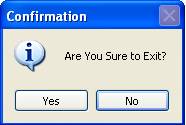
Here,
(1) Text is a compulsory argument. The String that you specify as a Text will display as a message in the Dialog Box.
(2) Caption is a compulsory argument. The String that you specified as a caption will be display in the title bar of the Dialog Box.
(3) Buttons is used to specify type of buttons to display in the message box.
(4) Icon is used to specify type of icon to display in the message box.
Possible values for Button argument are
MessageBoxButtons.OKOnly |
Display OK Button. |
MessageBoxButtons.OKCancel |
Display OK and Cancel Button. |
MessageBoxButtons.AbortRetryIgnore |
Display Abort, Retry and Ignore Button. |
MessageBoxButtons.YesNoCancel |
Display Yes, No and Cancel Button. |
MessageBoxButtons.YesNo |
Display Yes and No Button. |
MessageBoxButtons.CancelRetry |
Display Cancel and Retry Button. |
Possible values for Icon argument are:
MessageBoxIcon.Critical |
Display Critical icon. |
MessageBoxIcon.Question |
Display Question icon. |
MessageBoxIcon.Exclamation |
Display Exclamation icon. |
MessageBoxIcon.Information |
Display Information icon. |
Example of MessageBox Function in VB.NET
Design a simple application that displays a message box when user clicks on Close Form Button. If user clicks yes then form will be closed otherwise it remains open.
Step 1: Design a form as shown below:

Step 2: Now set properties of various controls as given below:
| Control Name | Property Name | Value |
Form1 |
Text |
MsgBox Function Demo |
Button1 |
Name |
cmdClose |
Text |
Close Form |
Step 3: Now Double click on Close Form Button and write following code display Message Box.
Me.Close()
End If