Example of Combo Box Control in VB.NET
Design an application that allows user to select language using ComboBox and Display it on label.
Step 1: Design a form as shown below:
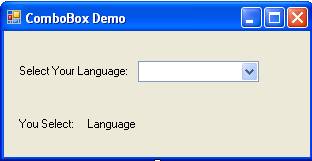
Step 2: Now set properties of various controls as given below:
| Control Name | Property Name | Value |
Form1 |
Text |
ComboBox Demo |
Label1 |
Text |
Select Your Language: |
ComboBox1 |
Name |
cmbLanguage |
Items |
Gujarati |
|
Label2 |
Text |
You Select: |
Label3 |
Name |
lblLanguage |
Text |
Language |
Step 3: Double click on Form and write following code in the load event of form to set index of ComboBox.
cmbLanguage.SelectedIndex = 0
Step 4: Now Double click on ComboBox and write following code in the Selected Index Changed event of ComboBox.
lblLanguage.Text = cmbLanguage.SelectedItem