Example of CheckedListBox Control in VB.NET
Design a simple application that display Roll Number of students in CheckedListBox and allow user to fill attendance of students. After filling the attendance it should display present numbers of student and also count how many students are present.
Step 1: Design a form as shown below:
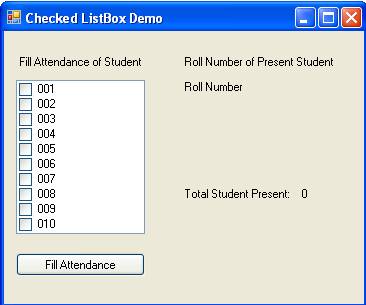
Step 2: Now set properties of various controls as given below:
| Control Name | Property Name | Value |
Form1 |
Text |
Checked ListBox Demo |
Label1 |
Text |
Fill Attendance of Student |
CheckedListBox1 |
Name |
chkRoll |
CheckOnClick |
True |
|
Items |
001 |
|
Button1 |
Name |
btnFill |
Text |
Fill Attendance |
|
Label2 |
Text |
Roll Number of Present Students |
Label3 |
Name |
lblRoll |
Text |
Roll Number |
|
Label4 |
Text |
Total Student Presents: |
Label5 |
Name |
lblCount |
Text |
0 |
Step 3: Double click on Fill Attendance button and write following code to display roll number of present students.
Dim count As Integer = 0
Dim present As String = ""
For i = 0 To chkRoll.Items.Count - 1
If chkRoll.GetItemChecked(i) = True Then
present = present & " " & chkRoll.Items(i).ToString
count += 1
End If
Next
lblRoll.Text = present
lblCount.Text = count