Example of CheckBox Control in VB.NET
Design an application that allows user to select Languages that he/she know and display it using CheckBox Control.
Step 1:Design a form as shown below:
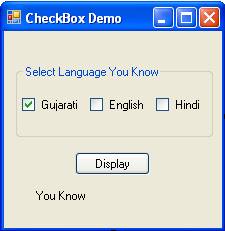
Step 2:Now set properties of various controls as given below:
| Control Name | Property Name | Value |
Form1 |
Text |
CheckBox Demo |
GroupBox1 |
Text |
Select Language You Know |
CheckBox1 |
Name |
chkGuj |
Text |
Gujarati |
|
Checked |
True |
|
CheckBox2 |
Name |
chkEng |
Text |
English |
|
CheckBox3 |
Name |
chkHindi |
Text |
Hindi |
|
Button1 |
Name |
cmdDisplay |
Text |
Display |
|
Label1 |
Name |
lblLanguage |
Text |
You Know |
Step 3: Now Double click on Display Button and write following code to display languages that you know.
lblLanguage.Text = "You Know "
If chkGuj.Checked = True Then
lblLanguage.Text = lblLanguage.Text & chkGuj.Text & " "
End If
If chkEng.Checked = True Then
lblLanguage.Text = lblLanguage.Text & chkEng.Text & " "
End If
If chkHindi.Checked = True Then
lblLanguage.Text = lblLanguage.Text & chkHindi.Text & " "
End If